Submit an HTML form to Numbers on iOS
The final step in de-Googling my life was eliminating my reliance on Google Forms. Luckily, the only form I still had was just for my own use, and fed into a Google Sheet that only I had access to.
I use this form every week or two from my phone to record the water test results for my aquariums. It had a field for each water parameter, and then I could track changes over time in the spreadsheet.
While I did consider switching to another cloud-based form hosting service or writing a standalone self-hosted application to just serve a simple form and record responses to a database (or even a text file), I found an approach that allows me to host only a static HTML file and store the responses in a Numbers spreadsheet that lives on my phone.
To make this work, I first wrote a completely normal HTML form hosted on a web server with HTTPS configured because navigator.share, like any new web API, requires HTTPS. I then hooked into the form's submit event with the following code:
function saveResults(event) {
    event.preventDefault();

    const data = Object.fromEntries(new FormData(event.target));
    const text = JSON.stringify(data);

    navigator.share({text});
    navigator.clipboard.writeText(text);

    return false;
}
This simply takes the form field names values and converts them to a JSON string, then opens it using the operating system's "share" interface. You can play with the live site to see how that works here. (If you don't know anything about aquariums it won't make a lot of sense, but that's okay because this post is about the form implementation and not its content.)
The other half of this workflow is accomplished by an iOS Shortcut that parses that string as a JSON object (or "dictionary" in Shortcuts terminology) and appends the values in the correct order to the end of my spreadsheet:
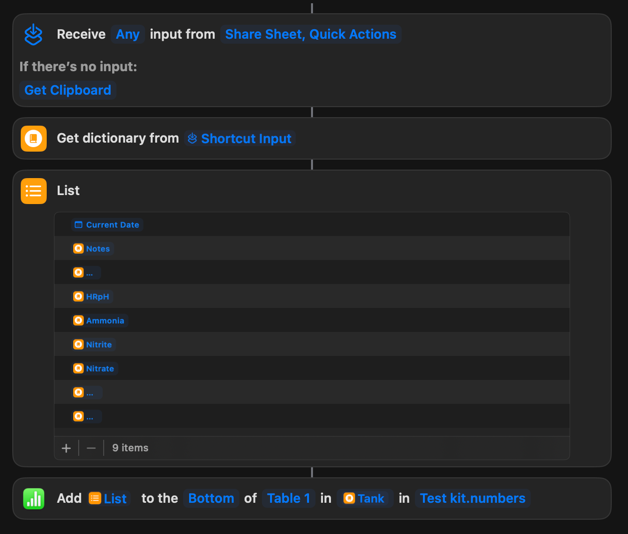
The Shortcut is set to appear in the operating system share interface, so when my form opens it, I just have to tap "Aquarium water test" in the "share to..." list, and it adds the data to the spreadsheet.
This works flawlessly on iOS, but for some inexplicable reason, sharing to a Shortcut on macOS just hangs the browser. Luckily, I use my phone for this anyway, but it would expand the general usability of this method a lot if I could figure out what was going wrong on desktop.
Compared to Google Forms, this even has two added benefits to my workflow:
- I can pre-fill the "Tank" input, which determines which sheet of the Numbers spreadsheet the row gets added to, using the
?Tank=URL parameter. (Maybe I'll explain why that's useful to me in a future post.) - It opens the Numbers spreadsheet showing the new row, so I can immediately see how the results compare to the prior measurements.
Hopefully this is a helpful starting point for anyone wanting to submit values from a complex form into a spreadsheet without relying on the cloud.
Comments ()